Free & open source

See what's really happening in your kid's Google Classroom.

One dashboard for every class. Every assignment. Every missing piece. No API access required — works with any school.

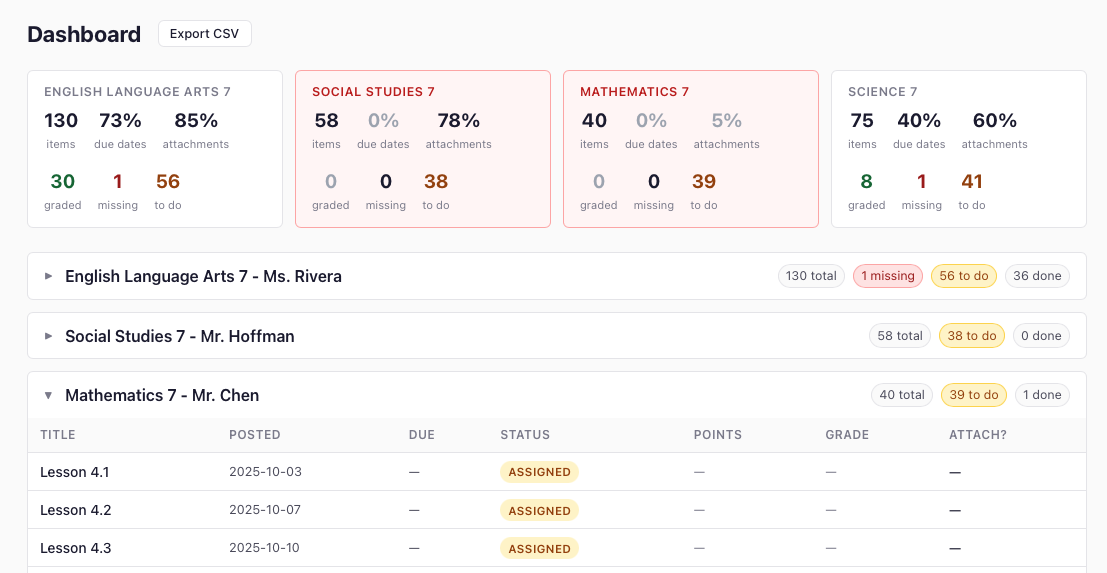
Glassroom dashboard screenshot

Dashboard view — all classes, all assignments, one page.

Google Classroom is designed for teachers, not parents.

You can log in. You can see one class at a time. That's about it. If you need a real picture of what your kid is working on — or not working on — Classroom doesn't help you.

🔍

No overview

You see one class at a time. To check six classes you click six times. There's no "everything in one place" — you have to carry it in your head.

Missing vs. never assigned?

When an assignment is blank, did your kid not submit it — or was it never assigned to them? Classroom won't tell you. You have to ask the teacher.

📋

IEP accommodations aren't visible

Your kid's IEP requires certain accommodations. Whether those modifications actually appear in assigned work — extended time, reduced load, modified content — isn't tracked anywhere.

📉

No history when grades drop

By the time you see a bad grade, the assignments behind it are buried. There's no way to go back and see what happened week by week without digging through every class manually.

⚖️

No way to compare teachers

One teacher posts 140 structured assignments with due dates and attachments. Another posts 61 with nothing. Same school. Same kid. You can't see the difference without clicking into every class individually.

What Glassroom does.

Glassroom runs on your computer and scrapes your kid's Google Classroom assignments into a local database. No API access. No third-party servers. Just you and the data.

📊

One dashboard, all classes

Every assignment from every class in a single scrollable view. Color-coded by status so you can see the whole picture at a glance.

Status that actually means something

Missing, Assigned, Turned in, Graded — shown clearly with color badges. The "To Do" view is filtered to exactly what needs action right now.

📄

Downloads all attachments

Every PDF, document, and slide deck attached to an assignment is automatically downloaded and saved. Evidence that work was or wasn't provided.

📤

Export everything

Export everything to a CSV for your records, or to a database for advanced filtering, sharing, or handing to an advocate.

🔒

Runs locally, stays private

Glassroom runs on your own computer. Your kid's data never leaves your machine. Nothing is sent to any server.

🔄

Re-runs as often as you want

Run a scrape every day or every week. Glassroom tracks what changed — new assignments, updated statuses, new grades.

Who it's for.

Glassroom was built by a parent who needed it. These are the parents it's designed for.

Parents staying on top of homework

Your kid says everything is done. Glassroom shows you what's actually submitted, what's still assigned, and what's missing — in one view.

Parents of kids with IEPs

You need to know whether the accommodations in your kid's IEP are being implemented in actual assigned work. Glassroom gives you the paper trail to verify everything that was — and wasn't — provided.

Parents of kids on medical leave

When a student misses weeks of school, tracking what was assigned during that time is a full-time job. Glassroom makes it one command.

Special education advocates

Gathering evidence for an IEP dispute or due process hearing requires documentation. Glassroom creates an exportable, timestamped record of what was actually assigned.

Up and running in 4 steps.

You need Docker. That's it. No Python, no terminal experience beyond copy-pasting one command.

01

Install Docker

Download and install Docker Desktop for Mac or Windows. It's free.

02

Download Glassroom

Download the ZIP from GitHub and unzip it anywhere on your computer.

03

Run one command

Open a terminal in the Glassroom folder and run:

04

Open your browser

Visit localhost:3000 and follow the setup steps. Log in, pick your kid's classes, scrape.

# In the glassroom folder:
$ docker compose up

# Then open:
$ open http://localhost:3000
View full instructions on GitHub →

Open source. Free forever.

Glassroom is MIT licensed. No accounts, no subscriptions, no data leaving your machine. Built by a parent who needed it — shared with every parent who needs it too.

MIT License No accounts required No data collection Self-hosted
View on GitHub